3 Big Takeoff Boost Updates Since July 1
1. Wall Partition Type Detection is a major win for drywall estimators
The newest update, released August 3, is Wall Partition Types Detection for Drywall. This feature enables Auto Takeoff to read wall type tags on the plan, compare them against partition details elsewhere in the drawing set, and automatically create separate drywall conditions based on the assembly details it finds. It then adds those details to the Condition Names and Notes.
Why This Matters
This is the kind of update drywall contractors immediately understand. On many jobs, the plan only shows a simple wall tag such as A1 or B2. The actual assembly details live somewhere else in the set, usually in a partition details page or schedule. Historically, that meant estimators had to stop, hunt down the referenced detail, and manually carry those specifications back into the takeoff. Now, Auto Takeoff can pull in information such as:- Number of drywall layers
- Board type, including regular, moisture-resistant, fire-rated, and acoustic or smoke-rated board
- Stud gauge or wall thickness
- STC rating
- Additional assembly notes such as stud type, insulation, and floor or roof deck details
2. Finish Schedule Detection makes painting takeoff far more detailed
- On July 29, ConstructConnect released Finish Schedule Detection, which allows Auto Takeoff to identify wall finish tags from a finish schedule on renovation and addition plans and automatically create separate Conditions for different finishes, rather than rolling everything into one generic condition.

Why This Matters
- This is a meaningful improvement for painting workflows. Finish schedules often hold the real story behind the plan, especially when walls need to be broken out by directional finish details, such as north, south, east, and west. Before this update, estimators often had to manually reassign walls after the automation ran. Now, Auto Takeoff can separate those finishes into distinct Conditions automatically.
- The release also introduced a Plan North option to help ensure finish assignments line up to the correct wall orientation, which is especially useful on plans that are rotated.
- Paint Types detection currently works when the finish schedule is on the same PDF page as the plan.
3. Concrete Slabs and Linear Footings Help Concrete and Site Contractors Move Faster
On July 10, ConstructConnect added support for Concrete Slabs and Linear Footings to Auto Takeoff, expanding the service beyond interior-focused workflows and further into concrete and site applications. This release helps concrete and site contractors reduce manual work.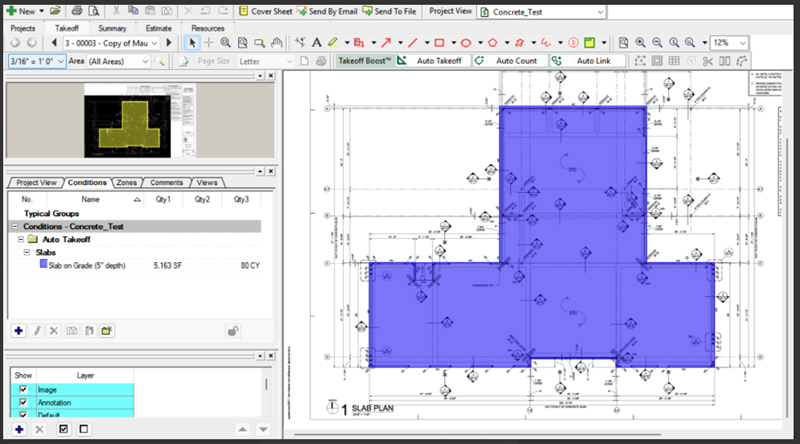 Auto Takeoff’s concrete slab results
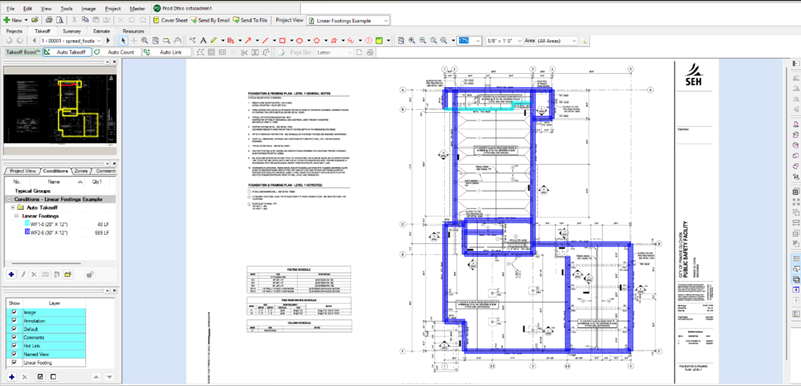 Auto Takeoff’s linear footing results
Why This Matters
This update extends the reach of automated takeoff into categories where speed and measurement accuracy can have a direct impact on bid turnaround. For contractors estimating slabs and footings, any reduction in manual tracing means more time spent validating scope and less time doing repetitive setup. See the Takeoff Boost Service Update Release Notes for everything else we’ve been working on so that you can get real value out of Takeoff Boost’s tools.What These Updates Signal About the Direction of Takeoff Boost
Taken together, these releases show a clear product direction. ConstructConnect is not just trying to automate linework or speed up first-pass quantity generation. It is steadily teaching Takeoff Boost to understand more of the context hidden inside plan sets.That includes:
- Reading schedules and details, not just visible geometry
- Splitting conditions more intelligently based on real scope differences
- Carrying richer context into Condition names and notes
- Reducing the amount of post-run cleanup estimators have to do before pricing
For users, that means the output is becoming more actionable. Instead of getting one broad automated result and spending the next 20 minutes fixing it, estimators are getting takeoff that is closer to bid-ready from the start.
Benefits for Contractors Right Now
Every one of these updates targets a common source of wasted estimating time.
- Drywall estimators need wall tags connected to the actual partition assemblies behind them.
- Painting contractors need finish schedules translated into usable conditions without manual sorting.
- Concrete teams want faster quantity generation on slabs and footings.
In each case, the value is not just automation for automation’s sake. The value is removing repetitive interpretation work that slows bids down and introduces avoidable errors.
Takeoff Boost’s Auto Takeoff has seen meaningful momentum since it was first released in 2023. With new support for concrete slabs and linear footings, smarter finish schedule detection for painting workflows, and powerful partition type detection for drywall, ConstructConnect is continuing to push automated takeoff closer to the way experienced estimators actually think.
That is good news for teams trying to bid more work without adding more manual effort. The more Takeoff Boost’s Auto Takeoff can interpret directly from the plans, the faster estimators can move from takeoff to decision-making.
Want to see Auto Takeoff in Action?