In short:
- AI-powered Takeoff Boost™ automates ceiling takeoffs, detecting ACT grids, gypsum ceilings, and drop ceilings from Reflected Ceiling Plans in seconds.
- Interior contractors report cutting takeoff time by up to 95%, improving accuracy and freeing estimators to focus on pricing strategy and competitive bid analysis.
- Takeoff Boost supports trade-specific ceiling details, including bulkheads, soffits, grid overlays, tile counts, and angle mold measurements for more accurate bids.
For interior contractors, the ceiling is often the part that takes the most time to measure. You aren’t just calculating square footage. You are considering a range of measurements, such as Acoustical Ceiling Tiles (ACT), gypsum bulkheads, soffits, and varying grid patterns. Manually doing ceiling takeoffs comes with immense pressure, and it eats up valuable time that you should be spending on pricing strategy and competitive bid analysis.
What if you could turn hours of manual tracing into seconds of accurate, automated takeoffs? On-Screen Takeoff® has been the industry standard for digital estimating for years. Now, with AI-powered Takeoff Boost™, interior contractors can perform ceiling takeoffs without the stress.
Why Use Ceiling Takeoff Software with AI?
Manual takeoffs require a lot of time and are prone to human error. A single missed drop ceiling detail or miscalculated grid layout can eat into your profit margin.
On-Screen Takeoff with Takeoff Boost changes this workflow entirely by allowing you to accomplish more with the same resources. By leveraging AI, interior contractors can:
- Save time. Customers report cutting takeoff time by up to 95%, freeing up estimators for high-value tasks like building strong bids or vendor negotiations.
- Increase efficiency. AI acts as a first set of eyes, providing you with an initial draft to review in as little as 30 seconds.
- Think strategically. When you shift from manual takeoffs, you win back hours in the workday to focus on strategic analysis and improving bid profitability. Instead of spending time measuring and counting, you have more time to think strategically and scale your business.
How Takeoff Boost Works for Interior Contractors
Takeoff Boost is an AI-powered feature that can automatically scan Reflected Ceiling Plans (RCPs). When you run it on a ceiling plan, it instantly scans the document and identifies the distinct patterns of ACT grids, the shading of gypsum wallboard, and the lines of drop ceilings.
In as little as 30 seconds, Takeoff Boost generates separate conditions for each ceiling type. Instead of a blank blueprint, you are presented with a nearly complete takeoff. The software automatically separates your 2×2 grids from your 2×4 grids and your drywall ceilings, giving you a massive head start.
Takeoff Boost does the heavy lifting, but you provide the expertise. Once an interior contractor receives the results from Takeoff Boost, he or she can fine-tune the results for a perfect bid.
Here are some trade-specific things to look out for when it comes to a ceiling takeoff:
Bulkheads and Soffits
Ceilings are rarely flat planes. You often deal with vertical folds, complex bulkheads, and soffits that complicate square footage calculations. These features significantly impact labor costs for framing and finishing.
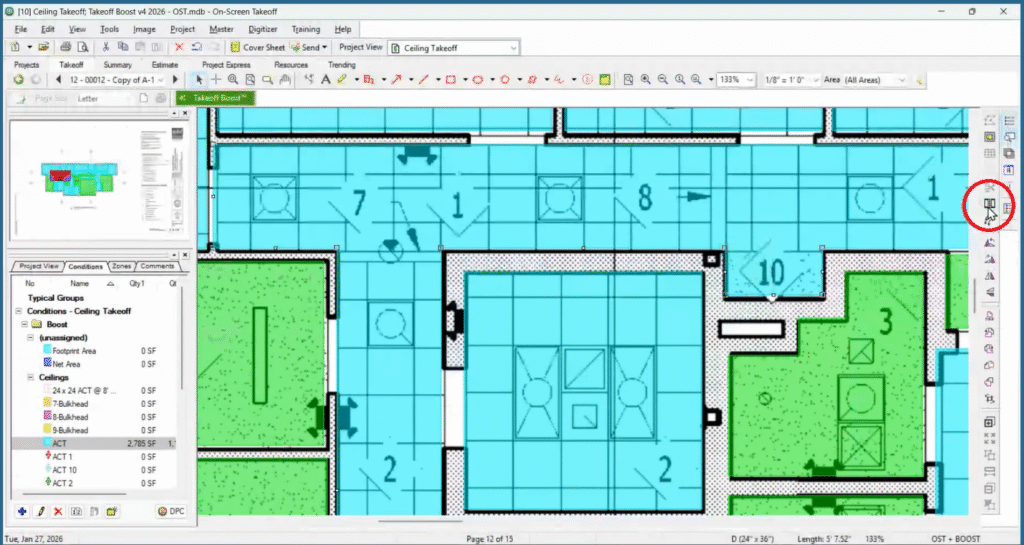
Once Takeoff Boost generates the initial results, you can use the Split Area tool to quickly separate bulkheads from the main ceiling area. Once split, simply reassign these shapes to a new condition (e.g., “Gypsum Soffit”). This ensures your bid accurately reflects the additional labor and materials required for these architectural features.

Grid Overlays
For ACT ceilings, square footage is just the beginning. You need tile counts and grid components. Once Takeoff Boost identifies an ACT area, you can align the grid in On-Screen Takeoff to match the RCP exactly. This allows you to generate precise Tile Counts and calculate Grid Length automatically. You can even generate a Perimeter measurement for your angle mold in the same step.


Managing and Modifying Conditions
Once Takeoff Boost measures a plan, you can review the results and modify it as needed:
- Reassign in bulk. Instead of manually reassigning each specification, you can select groups of ceilings and right-click to reassign them to a specific style from your library (e.g., “ACT – Corridors – 9ft”).
- Align grid. On-Screen Takeoff makes it easy to activate grids, set grid parameters, and use grid-specific quantity results to accurately calculate items such as tile counts or rebar lengths.
- Review returned results. Easily modify results from Takeoff Boost to ensure complete accuracy.

Take Your Interior Business to the Next Level
Ceiling takeoffs don’t have to slow you down. On-Screen Takeoff with Takeoff Boost takes care of the busy work, so you can get your numbers fast and move right into pricing. The counts are quick, accurate, and easy to trust. That means you can bid sooner, win work earlier, and get rolling while everyone else is still measuring plans.
Customer Spotlight: Sheri Winslow
Sheri Winslow, Lead Estimator at AKS Interior Systems, is a pro when it comes to specialty acoustics, baffle ceilings, wall panels, and more. Hear how Takeoff Boost is helping Sheri scale the business by cutting her estimating time from days to minutes.
Try Takeoff Boost for Free. No Download Required.
See your plan measured in seconds with an online preview of Takeoff Boost. No software install. No credit card. No commitment. Just upload a single-page commercial plan and watch AI complete the first pass of your takeoff, right in your browser.
Stay tuned for the next installment in our blog series: AI Takeoffs for Flooring Contractors.
Frequently Asked Questions
Yes. Takeoff Boost doesn't rely solely on tags. It analyzes visual patterns and shapes on the drawing. It can distinguish the cross-hatch of a grid from the stipple or shading of drywall, meaning you can get accurate results even on plans that lack detailed labeling.
Initially, Takeoff Boost captures the footprint of the ceiling. However, you can easily manage heights by duplicating your conditions. For example, duplicate a "Wallboard" condition and name one "8ft Ceiling" and the other "12ft Ceiling." Then, simply select the rooms on the plan and reassign them to the correct height condition with a right-click.
While you can enable the "Grid" and "Perimeter" features in Condition Properties to determine linear footage and square footage, these numbers are not direct material calculations. You'll need to perform additional calculations to determine the exact material requirements.
For precise material and labor calculations, consider using Quick Bid®. It seamlessly connects to provide detailed estimates tailored to your project needs.
Yes, Takeoff Boost detects visual patterns to differentiate between common grid sizes and automatically separates them into unique conditions.