In short:
- Takeoff Boost™ in On-Screen Takeoff® automates footprint area, net area, walls, and trim measurements, delivering an initial takeoff in under a minute and cutting manual takeoff time by up to 95%.
- Room-by-room net area, transition strip quantities, and tile counts are generated automatically, then quickly refined with simple reassignment tools for different flooring types and conditions.
- Flooring contractors can get precise tile counts, reduce material waste, and help produce faster, more accurate bids while staying within their existing On-Screen Takeoff workflow.
Manually measuring every room, corridor, and closet on a set of plans in a time-consuming but necessary part of a flooring contractor’s job. This process, while critical for an accurate bid, often slows down your ability to bid on more projects. What if you could automate the most time-consuming parts of this process and get a massive head start on your flooring takeoffs in just under a minute?
With Takeoff Boost, the AI-powered takeoff feature in On-Screen Takeoff, you can do just that. This tool automates the initial takeoff process, so you can spend less time counting and measuring and more time refining your bid. Whether you’re flooring a high-rise, a school, or a retail space, you can win more work by completing accurate estimates faster than ever.
Why Use AI for Your Flooring Takeoff?
On-Screen Takeoff with Takeoff Boost transforms the takeoff and estimating process by letting you get more work done without adding additional resources.
With the help of AI-assisted takeoffs, floor contactors can:
- Reduce time spent on takeoffs. Customers report cutting their takeoff time by as much as 95%. This means estimators can focus on other parts of the job that bring value like crafting strong bids and negotiating with vendors.
- Increase your team’s productivity. Takeoff Boost generates an initial draft for you to review in as little as 30 seconds. Think of it as an assistant that you don’t have to hire.
- Focus on business growth. Moving away from manual takeoffs frees you up for strategic thinking and enhancing bid profitability. Rather than spending hours measuring and counting, you can invest in scaling your business.
How Takeoff Boost Works for Flooring Contractors
Takeoff Boost is purpose-built to streamline the flooring takeoff process by using AI to automate key elements on architectural floor plans. Instead of manually redrawing, you can let the software detect and measure footprint area, net area, walls, and trim. This allows you to focus your expertise on pricing and validation.

Net Area Takeoffs for Every Room
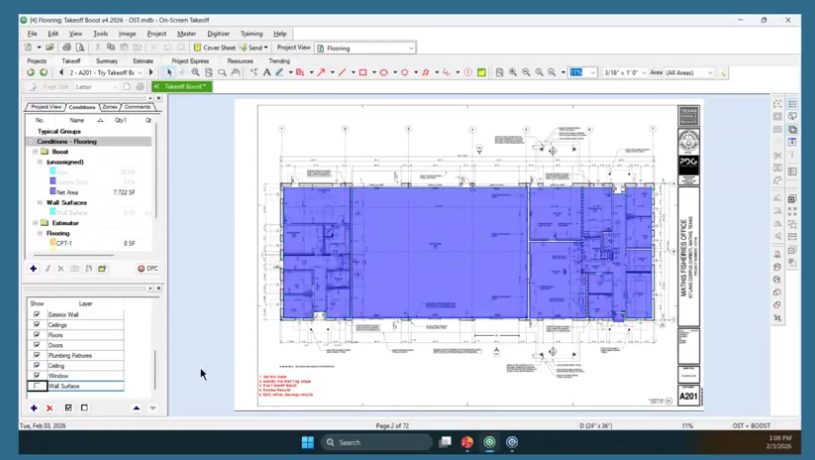
Imagine opening a new project and, instead of spending hours drawing out each room, you simply click a button. In about 30 to 45 seconds, Takeoff Boost scans the plan and delivers a comprehensive initial takeoff. This isn’t just a simple outline; it’s a detailed measurement of every individual space on the floor plan.
For flooring contractors, the ability to automate net area measurements is transformative. Takeoff Boost automatically identifies and measures each room as a separate area; every office, conference room, restroom, and corridor is individually quantified. The time it would have taken to manually trace these spaces is reduced to seconds. Now, your job shifts from tedious manual drawing to simply verifying and assigning materials.
Easily Assign Flooring Types
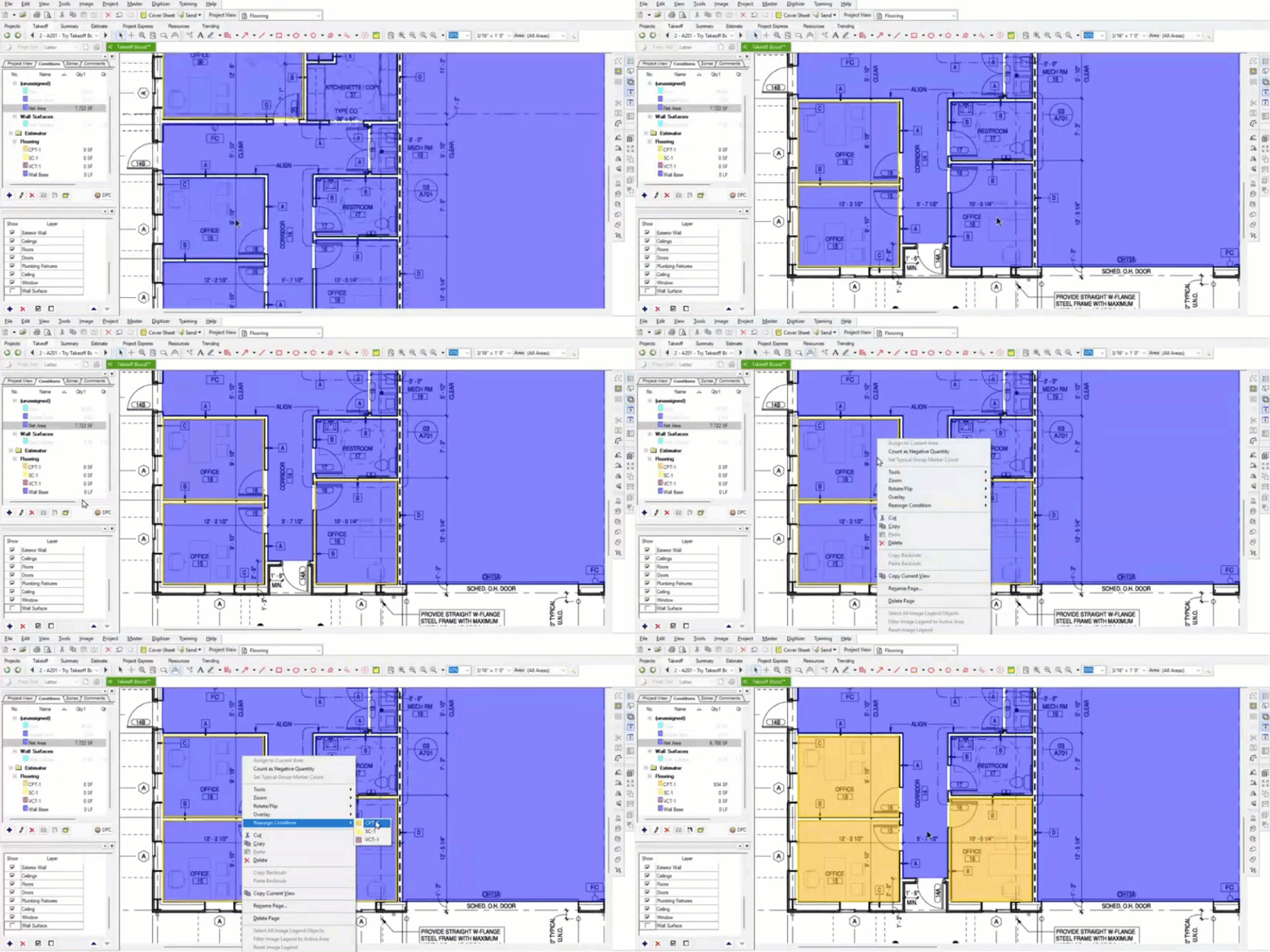
Once Takeoff Boost completes its work, you have a fully measured floor plan. The next step is assigning the correct flooring materials to each space. This is where the efficiency truly shines. Instead of measuring and then assigning, you can now focus solely on the assignment.
With your finish schedule handy, which you can even pull up in a separate window using On-Screen Takeoff’s Hot Links feature, you can quickly group and assign materials. Do multiple offices require the same carpet? Simply hold the shift key, select all the corresponding rooms, and reassign them to your “Carpet” condition with a right-click. Need to assign VCT to the corridors and kitchenettes? Select those areas and reassign them in one go. This streamlined process transforms a multi-step, time-intensive task into a quick and simple assignment workflow.
Transition Strips Made Simple
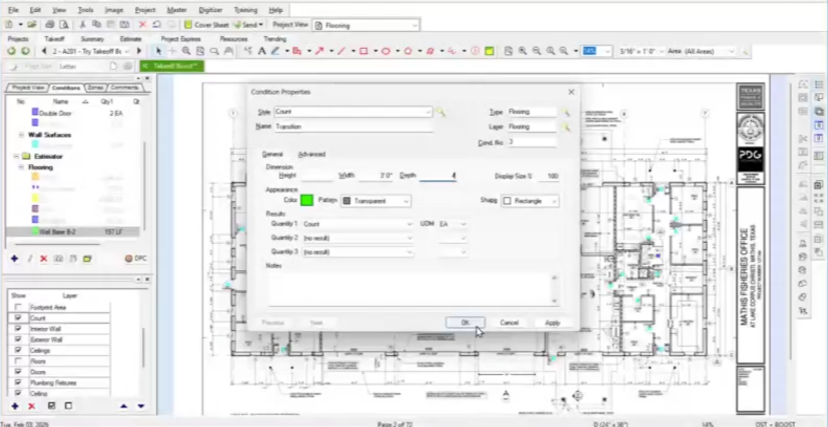
Transition strips are easy to overlook but critical to your bid accuracy. By running the “Doors” count, Takeoff Boost marks every doorway. Since you likely don’t need transitions at exterior doors, you can quickly deselect those. Then, with a single right-click, reassign all the interior door counts to your custom “Transition Strip” condition. You can even create different conditions for different transition types (e.g., carpet-to-tile vs. carpet-to-VCT).
Accurate Tile Counts with Grid Calculations
For projects involving tile, getting an accurate count is essential for ordering materials and minimizing waste. On-Screen Takeoff allows you to take your area measurement a step further. Once you’ve assigned a room to your “Tile” condition, you can use the advanced grid feature.
By simply inputting the dimensions of your tile (e.g., 12″ x 24″), the software overlays a grid on the area takeoff, providing you with a precise tile count for that space. While the grid appears as a simple stack bond, it delivers a highly accurate quantity that accounts for the specific tile size.

Take Your Flooring Business to the Next Level
The flooring business moves fast, and staying on top of estimates can be a challenge. With Takeoff Boost, you can speed up your estimating process, reduce mistakes, and keep your projects rolling.
Try Takeoff Boost for Free. No Download Required.
See your plan measured in seconds with an online preview of Takeoff Boost. No software install. No credit card. No commitment. Just upload a single-page commercial plan and watch AI complete the first pass of your takeoff, right in your browser.
Stay tuned for the next installment in our blog series: AI Takeoffs for Insulation Contractors.
Frequently Asked Questions
Takeoff Boost automates the process of measuring and dividing up project spaces, helping you complete initial takeoffs in seconds. You can assign materials, capture wall base and transition strips, and even set up tile grids.
You can easily highlight the areas for each material you are working with and assign it to the appropriate condition. You will have separate, accurate quantities for each flooring type.
Yes! Takeoff Boost is a feature within On-Screen Takeoff so you can continue using your existing templates, conditions, finish schedules, and more without disruption.