

Getting started
Takeoff and estimating software has existed for over 30 years, but many estimators still rely on manual methods, including pencils, highlighters, rulers, and spreadsheets. Others who have upgraded their workflows to a digital solution may not be getting the most from their software.
Together, takeoff and estimating produce outputs that closely estimate the time, materials, and other resources required to complete a building project.
There's nothing inherently wrong with proven traditional techniques, but the construction industry is highly competitive. Your profits are tied to your ability to bid jobs accurately and quickly. The right software, including AI-powered tools, can help eliminate mistakes, allow you to bid more jobs, and ultimately increase revenue.
With the right technology, companies can:
So, how do you know if your business is ready for takeoff and estimating software? Spoiler alert: you are. This guide will help you understand why.
To survive, much less thrive, in this industry, you need to bring your A-game. That means leveraging tools that give you a leg up on competitors, give you time back for building relationships, and may even help you take nights and weekends off again.
This guide helps you:
- Assess the effectiveness of your current estimating process
- Determine what your business needs to meet its goals
- Understand which types of software solutions fit your needs
- Build a plan to trial software and confirm it's the right fit
- Identify the stakeholders to involve in your software evaluation
This guide helps you determine where your company is today and where it needs to go.
Do I need takeoff and estimating software?

Check each statement that's true:
Yes, I need takeoff and estimating software
You've recognized the value that takeoff and estimating software can bring to your business. These tools are widely available, more affordable than you think, and easy to implement. You can transform your business with one decision.
This guide walks through seven steps for selecting the right software, with checklists and tips along the way. Start by examining your current workflow. Then research the market and decide who on your team needs to be involved.
Document your current estimating process
To know where you need to go, you first need to understand where you are. This step takes the longest, but it's the most valuable. Map out your process to see how it works and who's involved at each stage. Doing this helps you find your biggest gaps and needs.
The process map below shows an example of a typical estimating process. Yours may look different, but it's a good starting point.
Typical process steps include:
Identify who needs to be involved, and why
Investing in new tools that help your team work smarter and faster is sometimes welcomed and sometimes resisted. Change can be hard. Recognize two groups: employees who need to be directly involved in the decision, and those who will be affected and should be kept informed.
Early buy-in shapes how your team experiences implementation, and clear communication is the key to earning that buy-in.
The process map from Step 1 will help you see which departments are affected. Now identify who to keep informed and who to directly involve in selection and purchase.
Stakeholders commonly affected include:
- Estimating staff
- Project managers
- Field supervisors and operators
- Owners and general managers
- Accounting department
- IT department
Estimators are usually affected the most, along with owners and general managers. Depending on your workflow, designers, architects, engineers, field operations staff, and accountants may need to know about the change without being directly involved in research and selection.
Who approves the purchase?
Who should help evaluate and implement the tool?
Who needs to understand the change and its timing?
Specify your requirements
Knowing your software requirements is essential to choosing the right tool. Document your system requirements and dependencies, as well as the features and capabilities you need.
Start by identifying your end goals. As you move toward a decision and through implementation, check your progress against these goals and adjust as needed.
Begin with these questions:
- Do you want to reduce the time it takes to complete bids?
- Do you need to improve your bid-to-win ratio?
- Do you need more visibility into estimated versus actual costs?
- How many people will use the software, and should it be easy to learn for every skill level?
- What are your expectations for maintenance and update frequency?
- Can each provider deliver the technical support you need?
- How will you get your team fully trained?Technical considerations
System requirements and dependencies
- Where is your data stored? (Web/Cloud, a local server, desktop hard drive)
- Accounting integration (how to get information out)
- Number of users (will it scale to support your entire team)
- Data export, import, and sharing
- Supported operating systems (Mac, PC, or both)
Technical support
- Hours of availability
- Support team location
- Expected response and wait times
- Available online and by phone
Subject matter expertise
Does the provider understand construction estimating, or are they only a software company? Companies with construction industry expertise are more likely to understand your specific needs and offer hands-on estimating support.
Software functions and capabilities
- AI Takeoff (this is more important that you may realize, see the related article, What is AI Takeoff? How Estimators Are Bidding More Without Adding Staff)
- Multi-user data access/collaboration
- Color-coded takeoff features (if it's colored, it's counted)
- Comparing revisions to identify changes and addendums
- Ability to quote by building area, zone, or phase
- Ability to share or send plans and bids
- Intuitive layout and functionality for faster adoption (what's the learning curve)
- Pre-populated, customizable bid reports
- Annotations/Plan Markups
- Filtering, grouping, and searching
Service, support, and update process
- What are your training options? (Walk-thrus, Videos, Webinars, Customized 1:1 or Team Training)
- What are the self-service options? (FAQs, User Guides)
- Can you get to the training and self-service content prior to purchase?
- How the software is updated
- Are updates automatic or user-controlled
- Are updates non-disruptive
- Whether you're notified ahead of scheduled updates
Research your options
There are many software programs to choose from. Approach this like any other business purchase, with research and due diligence.
- Let your employees know you're evaluating new software
- Ask professional trade networks and associations for recommendations
- Visit software company websites to see what they offer
- Match each company's features to your needs
- Schedule demos and include the right employees
- Start free trials and evaluate them fully
- Ask companies you're interested in for references
- Verify that any vendors you are considering provide training and support options that meet your needs
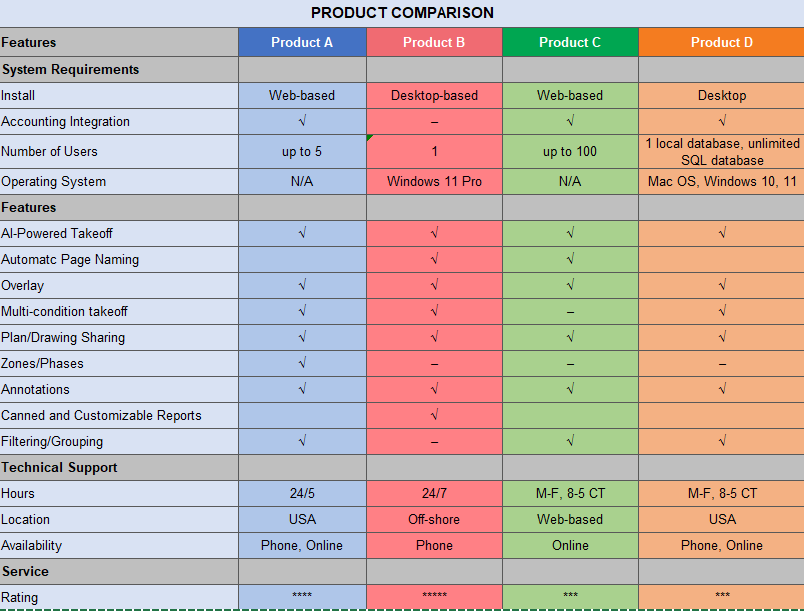
Understand the real cost
- License and ongoing maintenance costs
- Training, now and in the future
- Hardware setup plus internal IT, security, and network requirements
Watch for hidden costs. Ask direct questions about cost and demand thorough answers. You want to work with a reputable, trustworthy company.
Make a selection and build an implementation plan
Once you've selected your takeoff or estimating software, build an implementation plan to help ensure a successful launch. Most takeoff implementations are quick: install, train, and go. Estimating software often takes a little more time because it may require customization based on your specific trade, the way you apply costs, or other configuration requirements.
Communicate your plan to the stakeholders you identified in Step 2. Your checklist should include a timeline with a go-live date and any steps for installation, customization, data migration or integration, and training. You can set a go-live date or tie the launch to your first project using the new software.
Work with your vendor to fine-tune your implementation plan, they should have experience in this and be able to guide you through the process.
Launch your new software
It's time to modernize your estimating process. Most estimating software is simple to launch, often through a two-step download and activation process. Cloud-based programs are available through a software-as-a-service subscription accessed through a web browser. Your provider should guide you through the process.
At the start of implementation, test at least one project to confirm the system is working as expected. This helps get everything off to a good start.
The #1 thing you can do to get your team "on board" is to show them what the solution can do for them. Demonstrate how to create a project, use the tools to complete takeoff and estimating faster, more accurately, and easier than ever.
Get trained
Installation and activation are usually easy, but training takes more time. Follow your provider's recommendations for full implementation, and make sure training is thorough. Training doesn't end when formal sessions do. It takes time to adapt, so set realistic expectations.
Connect and integrate
Learn how to apply costs to your takeoff results whether it is an estimating app or a spreadsheet.
Build or customize your cost database. Enter historical labor, material, and completion data from successful jobs to get the database up to speed. The more accurate and current the information, the more useful the tool becomes.
Conduct a post-installation review
Take time to reflect, analyze, and adjust. Like any investment, it's important to measure success. The impact of estimating software often shows up quickly in your bottom line.
Once the software is fully launched and your business is operating normally, gather feedback on the implementation process and the tool's performance. Talk to employees who were involved in the decision, as well as those affected by this decision.
Hit a bump in the road? Talk to your vendor - they've likely been through hundreds of roll-outs and can help you help your team adjust.
Revisit your goals
- Do you have visibility into estimated versus actual costs?
- Is the software easy to use? Has your staff adopted it well?
- Do you understand what's needed for ongoing maintenance?
- Is your provider responsive to your questions and needs?
- Is your team fully trained, or is more training needed?
For a complete analysis, review your results over time: quarterly, after one year, and after two years.
Calculate your ROI
Reviewing your results, along with feedback from your team, should help you see the tangible and intangible benefits of your estimating software.
| Metric | Value | Unit / calculation |
|---|---|---|
| Discovery | ||
| Number of estimators | estimators | |
| Projects bid per week | projects / week | |
| Average price per project bid | per project | |
| Close rate on projects bid | discovery input | |
| Average net profit margin | net margin | |
| Calculation assumptions | ||
| Weeks per year | weeks / year | |
| Pre-software effective close rate | used for pre-software outputs | |
| Post-software bidding increase | increase in bids | |
| Post-software effective close rate | used for post-software outputs | |
| Pre-software situation | ||
| Bidding | 130 | jobs per year |
| Those jobs are valued at about | $23,400,000 | total bid value |
| We’re winning | 33 | jobs per year |
| Our annual revenue is about | $5,940,000 | annual revenue |
| We’re making about | $534,600 | in net profit |
| The benefit, post-software | ||
| Bidding | 182 | jobs per year |
| Close rate on projects bid | 50% | effective close rate |
| We’re winning | 91 | jobs per year |
| Our annual revenue is about | $16,380,000 | annual revenue |
| We’re making about | $1,474,200 | in net profit |
| Which is an increase of | 175.8% | profit increase |
Great software, great rewards
Choosing software for your construction business can feel intimidating, but it doesn't have to be. Follow the steps in this guide for a smoother transition to your new estimating software, and you'll soon start seeing the benefits of your decision.
See On-Screen Takeoff® and Quick Bid® Estimating in Action
See how ConstructConnect's AI-powered takeoff and estimating solutions can fit into and transform your team's workflow.